Lives in the menu bar · macOS 13+
macOS sees a touch monitor as a mouse and nothing more: no scrolling, no right-click, and taps that land somewhere else. TouchRotator fixes that.
Signed with an Apple Developer ID and notarized by Apple · JPY 1,980, one time
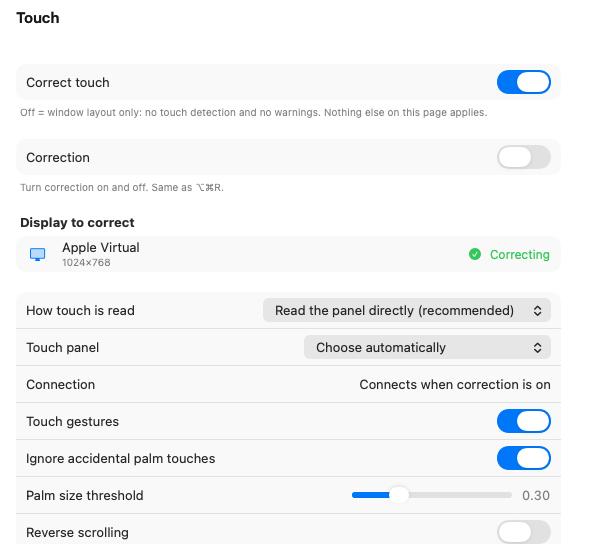
A touch monitor means two screens or more. Touch, display settings and window layout, all in one menu bar item.
It reads the panel's USB signal directly. Your trackpad and mouse carry on as before.
A small offset from the display area is settled with 4-point calibration.
Turn the panel 90° and macOS still receives the old coordinates. TouchRotator rotates them before passing them on.
Using the panel landscape? Then you never need this. ⌥⌘R turns it on and off any time.
Resolution, brightness, mirroring and rotation, from the menu bar. One card per display.
Press a display's name and its card opens.
 100%9:41
TouchRotator
● Correction is on
100%9:41
TouchRotator
● Correction is on
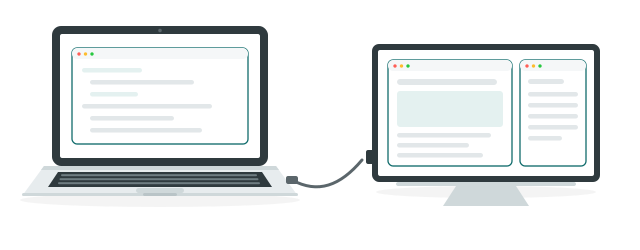
Unplug a monitor and its windows are pushed onto the built-in display; plugging it back in does not bring them home. TouchRotator remembers where they were and puts them back.
Arrange things how you like them, then press Remember this layout once. From then on it happens by itself.
Unplug the monitorand the windows are pushed onto the built-in display
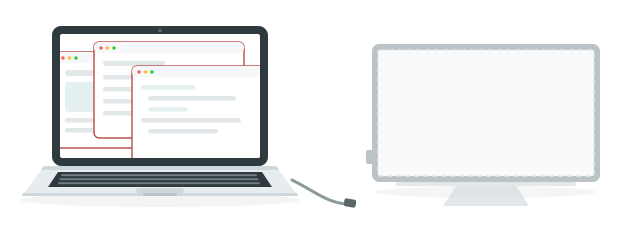
The Mac itselfThe touch monitor
↓ plug it back in, and by itself
Layout restoredthe same screen, the same size
A touch monitor plugged into a Mac can click, and that is all it can do.
The touch is driving another screen, or the panel is standing up and the coordinates are off.
Up goes down, right goes left. The panel's orientation has not been learned yet.
No more dragging everything back into place.
JPY 1,980 one time, tax included
Because the trial lets you check first, purchases are not refunded as a rule. They are processed by our merchant of record.
Not on sale quite yet. Until then it is free to use.
| OS | macOS 13 (Ventura) or later |
|---|---|
| Mac | Apple silicon and Intel |
| Touch panel | A USB HID digitizer. Landscape or standing up, either way |
| Permissions | Accessibility and Input Monitoring (the app walks you through them on first launch) |
| Languages | Japanese · English · Simplified Chinese |
| Signing | Signed with an Apple Developer ID, notarized by Apple |
Questions and problems: info@tsubomi.jp. We reply in English or Japanese.